
 Ilan Asseo
Marketing Qualified Lead: Definition, Triggers, Handoff
A practical guide to defining MQLs, channel-specific triggers, and a reliable MQL → SAL handoff that sales and marketing can operationalize.

If you ask five teams what a marketing qualified lead is, you will usually get six answers. That ambiguity hurts conversion, forecasting, and relationships between marketing and sales. In 2025, the strongest GTM orgs treat the MQL as a precise, operational state in the funnel, not a vanity count. This guide gives a working definition, specific channel triggers, and a practical handoff process that SDRs can trust.
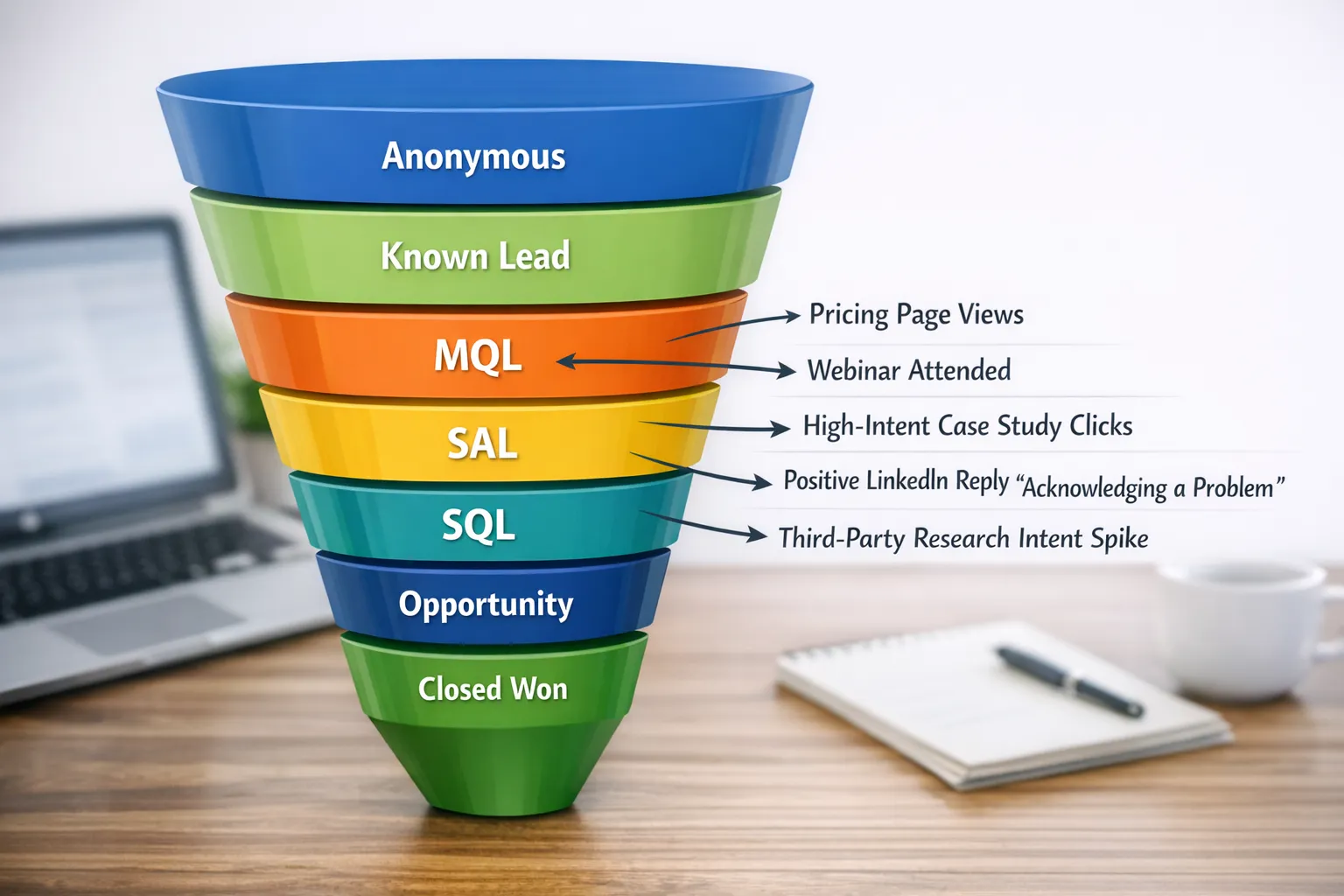
Industry evidence: Gartner’s research on the B2B buying journey shows that consensus creation is now a core buying job, which is why qualification needs buying-group evidence rather than single-contact activity.
Source: Gartner
What is a Marketing Qualified Lead
A marketing qualified lead is a person, or member of a buying group at a fit account, who has met agreed fit and intent thresholds within a recent time window and is eligible for timely sales follow up. Marketing and sales define the criteria together, instrument them in systems, and enforce SLAs for response and acceptance.
This aligns with industry frameworks like the Forrester B2B Revenue Waterfall, which emphasizes buying groups and stage clarity, and with practical definitions used by operators and platforms like HubSpot’s explanation of MQLs.
How MQL differs from adjacent stages:
- Lead or engaged person, any known contact exhibiting activity, not necessarily ready for sales.
- MQL, has enough fit and intent to justify sales outreach under a defined SLA.
- SAL, sales accepted lead, the SDR acknowledges ownership and agrees to work it, or documents a rejection reason.
- SQL, sales qualified lead, the rep has confirmed qualification that meets your SQL rubric, for example fit plus problem plus interest in next step.
If a form is an explicit request to talk, for example request a demo, most teams bypass MQL and route directly for immediate outreach and fast SAL.
The three pillars behind a defensible MQL
- Fit, does the person and account match your ICP, for example industry, company size, region, function, seniority.
- Intent, has the person or account engaged with enough high-intent behaviors, for example pricing views, product pages, competitive comparisons, topic research.
- Recency and density, did the signals happen recently and with enough clustering to indicate urgency, for example multiple high-intent actions within 7 to 14 days.
Many teams formalize these pillars in a simple scoring model. If you want a deeper scoring walkthrough, see Kakiyo’s guide on the lead qualification process.
MQL triggers by channel, with examples
Use triggers that are observable, recent, and auditable. The table below summarizes common triggers. Point values are illustrative, use bands and thresholds that match your data and sales capacity.
| Channel | High-intent triggers that often drive MQL | Notes |
|---|---|---|
| Website and inbound | Two or more pricing or product page views in 7 days, comparison or ROI content view, high-intent CTA click, webinar or live event registration and attendance, content download plus return visit | A demo request typically routes straight to sales, not MQL |
| LinkedIn conversations | Positive reply that acknowledges a relevant problem, asks a qualifying question, or clicks through to a case study or pricing from a DM, re-engages after content share with interest | Conversation evidence is gold, store text snippets or summaries as the MQL reason |
| Third-party intent | Account-level surge on your core topics, plus one or more known contacts engaging with your brand content within the surge window | Common sources include analyst sites and review platforms, for example G2 Buyer Intent |
| Events | Booth scan with topic interest, attended your talk or product session, requested follow up during or immediately after the event | Record the session and topic to personalize outreach |
| Product signals | Free tier or trial activity that shows activation depth or team invites | Many teams label these as PQLs. If your team uses MQL for all demand, keep separate reasons to analyze path performance |
Negative and suppression triggers:
- Student or personal email, competitor, partner, vendor, clear spam.
- Unsubscribe or do not contact.
- Ineligible region or segment.
- Existing open opportunity or active customer without an expansion motion.
A practical, channel-neutral MQL rubric
You do not need a complicated formula, you need something reps will trust and leaders can measure. A simple approach that works across inbound, events, intent, and LinkedIn:
- Fit gate, the account and person must meet ICP minimums, for example company size and target role. If the record fails the fit gate, never create an MQL.
- Intent gate, at least one high-intent trigger, or a cluster of mid-intent actions, within a 7 to 14 day window.
- Evidence requirement, store the why as a structured field, for example MQL reason equals pricing page plus positive LinkedIn reply. This improves rep trust and personalization.
For teams already using lead scoring, set an MQL threshold that requires both a minimum fit score and a minimum intent component, not just a total score, then include conversation evidence when it exists.
How to instrument the MQL state in your systems
Make the MQL a first-class stage in your MAP and CRM. Use explicit fields and automation so the logic is testable and the handoff is traceable.
Suggested fields to add or standardize:
- MQL date and time, set on first MQL only, do not overwrite.
- MQL reason, multi select such as, pricing page, webinar attended, LinkedIn positive reply, third-party intent surge, product activation.
- MQL channel source, web, event, LinkedIn, intent, product.
- Fit grade, A to D or numeric, do not accept MQLs below your cutoff.
- Buying group role, economic buyer, champion, user, influencer, other.
- Do not contact reason, unsubscribe, competitor, vendor, outside ICP, duplicate, customer.
- SAL status and SAL date, accepted, rejected, with required rejection reason codes.
Operational automation to include:
- Time decay, reduce intent points over time so old actions do not mint stale MQLs.
- De-duplication, auto merge or block duplicates so reps do not get multiple records for the same person.
- Ownership, round robin or territory assignment that respects account owner rules.
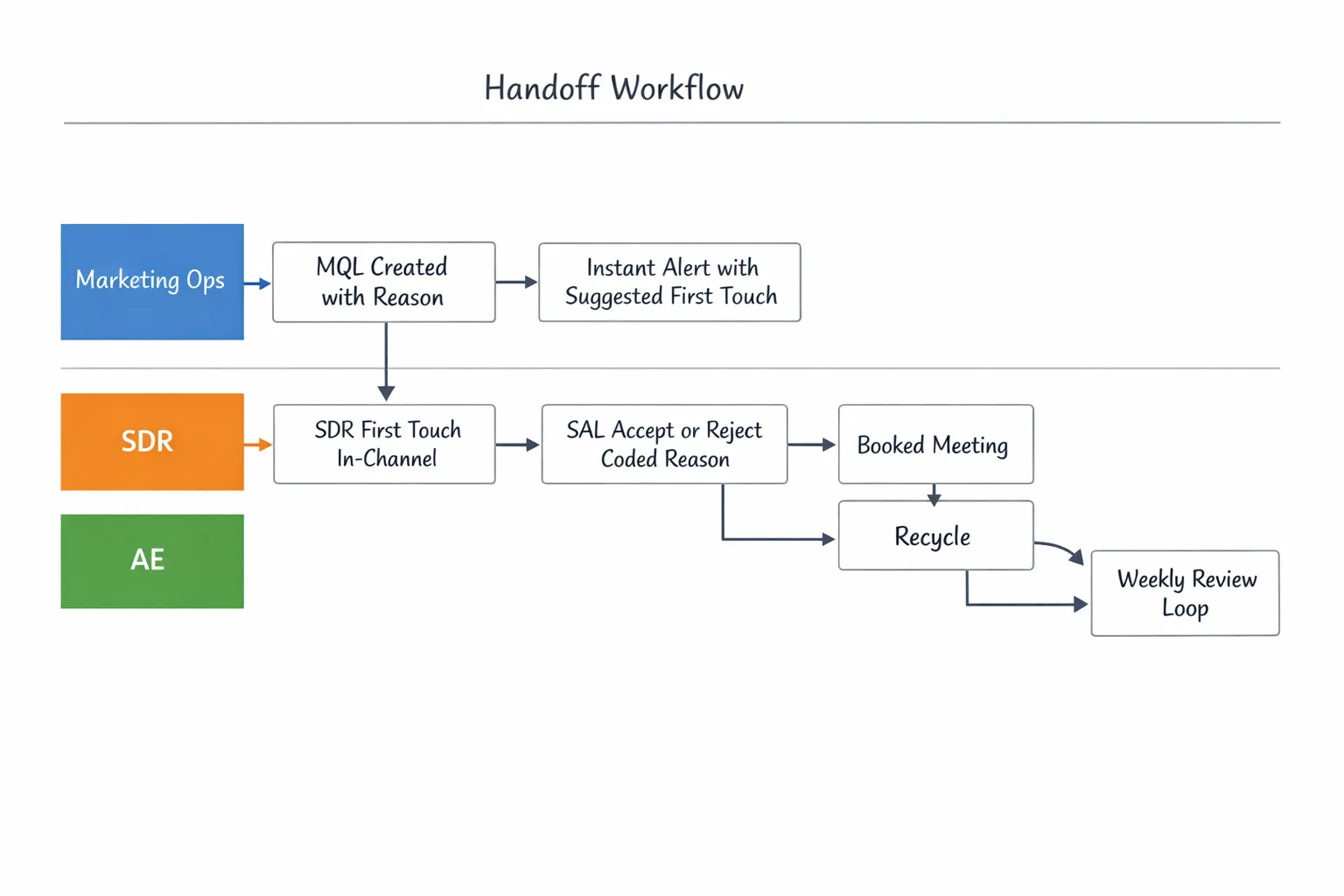
- Alerts, notify the owner in real time when an MQL is created, include the reason and suggested first message.
For teams on Salesforce, pair this with explainable scoring and list views that group MQLs into clear bands. Kakiyo’s guide to Einstein Lead Scoring covers adoption tips and pitfalls.
The MQL to SAL handoff, what great looks like
A strong handoff is the difference between pipeline and noise. It is also where trust is won or lost.
- Response time, minutes, not hours. Inbound studies have shown massive drop offs as time to first touch increases. A well known Harvard Business Review analysis found companies were many times more likely to qualify leads when responding quickly. Even though the study is older, the principle still holds.
- Channel continuity, respond where the intent started. If the MQL came from a LinkedIn thread, reply in the same thread first, then follow with email or phone if appropriate.
- Context carrying, include the MQL reason in the first message or call opener so the buyer does not have to repeat themselves.
- Acceptance discipline, SDRs must accept or reject within the SLA and use standard rejection reasons to close the feedback loop.
A simple checklist that SDRs and marketers can share:
| Step | Owner | What good looks like |
|---|---|---|
| MQL created | Marketing ops | Fit gate passed, intent gate met, MQL reason populated, owner assigned |
| Alert sent | Marketing ops | Real-time alert with reason, source channel, and suggested first touch |
| First touch | SDR | Within SLA, same channel when possible, message references the specific trigger |
| SAL decision | SDR | Accepts and works the lead or rejects with a standard reason, rejection triggers recycle rules |
| Next step | SDR | One clear ask, book time, confirm evaluation window, or qualify with two concise questions |
| Feedback loop | Both | Weekly review of conversion, rejections, and reasons, adjust triggers and messaging |
Rejection reasons to standardize:
- Not ICP, wrong segment, region, function, or seniority.
- No intent, activity was misclassified or too weak.
- Duplicate or already working, same person or account is already in motion.
- Customer or open opportunity, wrong motion for this contact.
- Out of market, no project this year, ask to recycle with a date.
Recycling rules:
- If no reply after a short, respectful sequence, move the person to nurture and track last attempt date.
- If the reason was timing, set a recycle date and a reminder to re-engage.
- For LinkedIn threads, close the loop politely in-thread to keep the relationship intact.
LinkedIn conversation triggers you should promote to MQL
LinkedIn is now a primary source of first conversations for many B2B teams. Conversation-level signals are often more predictive than click trails because they capture declared interest in natural language.
Promote to MQL when you see:
- A positive reply that acknowledges a relevant problem, for example we are trying to fix X this quarter.
- A question that indicates active consideration, for example how do you handle Y with Salesforce.
- Click through to pricing, ROI, or a case study from a DM, followed by any engagement.
- Multi-thread interest inside one account, two or more contacts reply or accept with context within a short window.
For conversation evidence, store a short summary in the MQL reason field, for example LinkedIn reply, acknowledged manual routing pain, asked about integration. This makes the SAL decision faster and personalizes the SDR’s first touch.
Kakiyo’s platform is built for this motion, autonomous LinkedIn conversations, AI-driven lead qualification, industry-specific templates, A/B prompt testing, intelligent scoring, and conversation override control help teams capture and standardize these signals at scale while keeping humans in the loop.
Messaging the handoff, proven first-touch patterns
First-touch messages should be short, buyer-first, and reference the trigger.
- Inbound pricing views, thanks for taking a look at pricing, happy to translate tiers for your team size and use case. Two quick questions to point you in the right direction, current tool and target go-live month.
- LinkedIn conversation, thanks for sharing that your team is routing LinkedIn replies to SDRs manually, we can share 2, 3 examples of teams automating the handoff without losing control. Is a 15 minute walkthrough this week useful, Tue 10 or Thu 2 Pacific.
- Event follow up, enjoyed your questions after the session on AI qualification, we have a 1 page checklist that sums up the flow and benchmarks. Want me to send it over and compare notes on your current process.
For full message frameworks and cadences, see our LinkedIn prospecting playbook and outreach examples.
Measuring MQL quality, not just quantity
Volume alone is meaningless. Track conversion, speed, and signal quality by cohort and by channel.
- MQL to SAL acceptance rate and average time to acceptance.
- MQL to SQL conversion rate and days to SQL.
- SQL to meeting rate and held rate.
- Precision and recall of your scoring, how many accepted MQLs were actually qualified, how many qualified opportunities never passed through MQL.
- Reason analysis, top MQL reasons that convert, top rejection reasons by channel.
- Capacity alignment, does your MQL creation rate roughly match SDR capacity at your target response SLA.
Review these weekly with both marketing and sales. Adjust thresholds, triggers, and messaging based on what converts, not on what is easiest to generate.
Common pitfalls and how to avoid them
- Score inflation, a high total score without a fit or intent minimum produces noise. Require both gates.
- Old activity, without time decay, last year’s webinar still mints this year’s MQLs. Add decay and recency windows.
- Vague reasons, reps distrust black boxes. Store a clear MQL reason that a human can read in 5 seconds.
- Single-threading, declare an account ready because one junior person engaged. Track buying group roles and promote when senior roles engage or when multiple roles show interest.
- Over-gating, collecting forms for low-intent content creates lead volume without intent. Prioritize high-intent triggers.
A 14 day plan to align definitions, triggers, and handoff
| Day | Focus | Output |
|---|---|---|
| 1 to 3 | Align definitions | Document ICP fit gates, MQL definition, SAL definition, SQL definition |
| 4 to 6 | Choose triggers | High-intent triggers by channel, negative triggers, recency windows, MQL reasons list |
| 7 to 9 | Instrument | Fields, automation, alerts, list views, routing rules, time decay |
| 10 to 12 | Enable | SDR one-pagers with triggers, first-touch templates by MQL reason, rejection reason codes |
| 13 to 14 | Test and adjust | Create a small cohort pilot, review MQL to SAL to SQL in a daily standup, tune thresholds |
Where Kakiyo fits
If LinkedIn is a meaningful part of your pipeline, your MQL program should capture and standardize conversation evidence, not just clicks. Kakiyo helps teams do this at scale while staying in control:
- Autonomous LinkedIn conversations, turn more first touches into high-signal threads.
- AI-driven lead qualification and intelligent scoring, convert conversation evidence into consistent MQL reasons and scores you can operationalize.
- Industry-specific templates and customizable prompts with A/B testing, raise the quality of signals that hit your MQL gate.
- Conversation override control, keep humans in the loop for sensitive accounts and nuanced replies.
- Centralized real-time dashboard plus advanced analytics and reporting, monitor acceptance, conversion, and lift by channel and message variant.
Ready to operationalize LinkedIn conversation signals inside a rigorous MQL program, Explore Kakiyo’s approach to automated lead qualification or request a walkthrough.
Further reading from Kakiyo:
- MQLs and SQLs: Align Definitions, Boost Pipeline Health
- Lead Qualification Process: Steps, Scoring, and Automation
- Automated LinkedIn Outreach: Do It Safely and Effectively
FAQ
What is the difference between a lead and a qualified prospect?
A lead is simply a potential contact or account. A qualified prospect has enough verified fit, intent, and context to justify a next sales step.
What makes qualification trustworthy?
Qualification is trustworthy when it relies on auditable signals, not labels alone. The more evidence a team can verify, the easier it is to align sales, marketing, and RevOps.
Should qualification be based on one score?
Not by itself. Scores are useful summaries, but teams still need explicit criteria around fit, buying signals, and next-step readiness.
How do I implement proof-based qualification in my team?
Start by defining what evidence is required at each stage, then make those signals visible in your workflows. The goal is consistency across inbound, outbound, and partner-sourced leads.