
 Ilan Asseo
Automated Lead Qualification: Playbooks, Tools, and Metrics
Guide to automated lead qualification with playbooks, tools, scoring logic, and metrics that turn signals into qualified meetings.

Most B2B teams do not suffer from a lack of leads, they suffer from slow, inconsistent qualification that starves pipeline. Automated lead qualification turns fragmented signals and scattered replies into a consistent, fast path from first touch to booked meeting. This guide gives you the playbooks, tools, and metrics to deploy it with confidence.
Industry evidence: Gartner’s research on the B2B buying journey shows that consensus creation is now a core buying job, which is why qualification needs buying-group evidence rather than single-contact activity.
Source: Gartner
What automated lead qualification is (and is not)
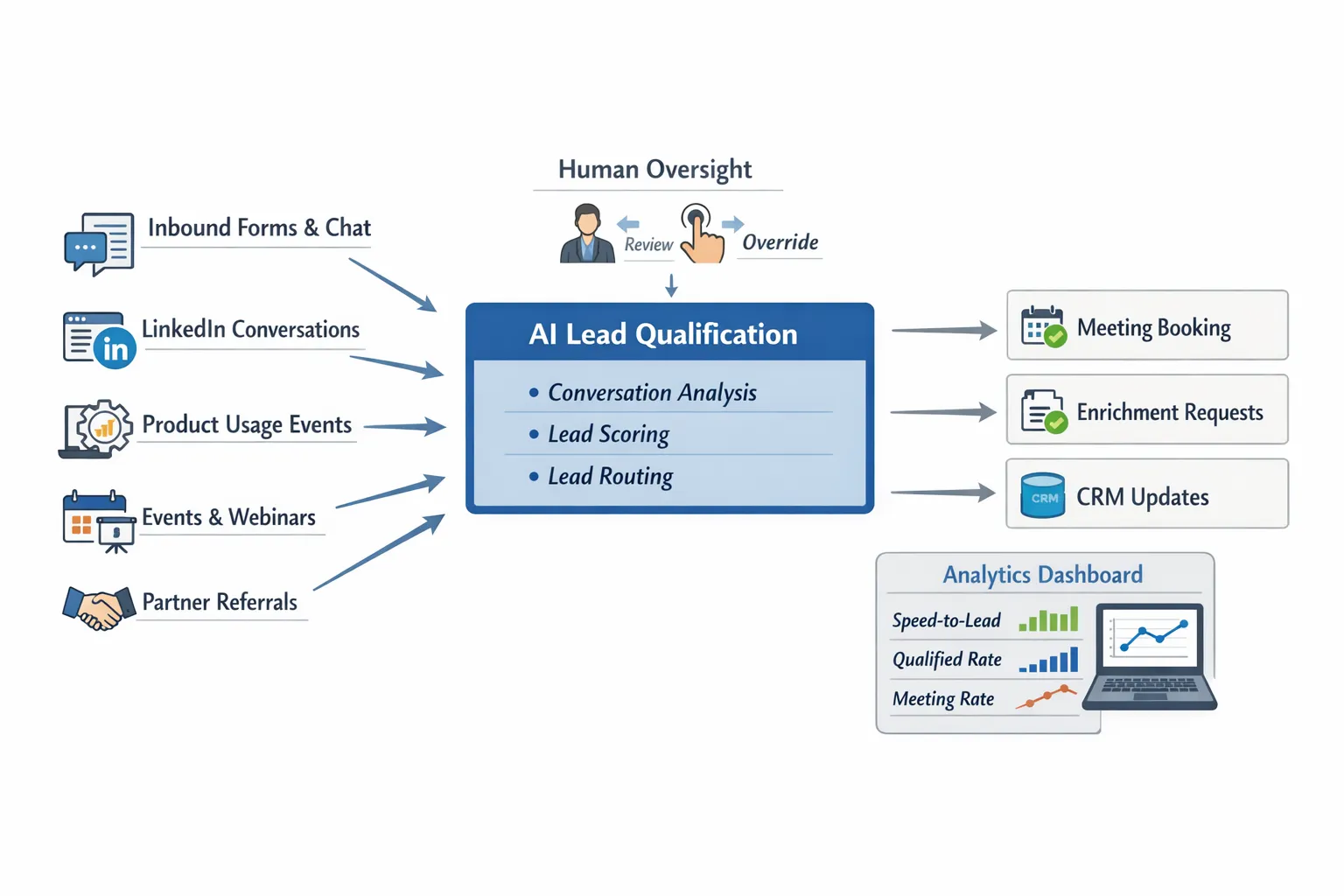
Automated lead qualification is a system that collects intent signals, engages prospects in-channel, validates fit and need with a lightweight framework, then books the next step or routes to the right owner. It blends rules and models, combines data and conversation, and runs in minutes instead of days.
It is not the same as simple lead scoring. Scores predict likelihood. Qualification verifies reality. The best systems use scoring to prioritize who to talk to, then use short, respectful conversations to confirm pain, priority, and timing.
If your team has not aligned stage definitions and SLAs, start there. Clear, shared definitions of MQL, SAL, and SQL remove the guesswork and make automation measurable. See our guidance on MQLs and SQLs: Align Definitions, Boost Pipeline Health.
The qualification framework to operationalize
Keep it simple and channel friendly. A four-part framework works in LinkedIn, chat, and email:
- Context, establish the situation and role relevance.
- Problem, confirm a current friction or goal missed.
- Impact, quantify cost, risk, or upside if solved.
- Timeframe, identify priority window and next step owner.
Two or three short messages can capture this without interrogating prospects. Your AI or SDR should stop once a meeting is justified, then propose one clear next step.
Playbooks you can put in market
Inbound form or chat hand-raiser
Inbound hand-raisers deserve minutes, not hours. Automate the first touch, enrich missing data, and validate the meeting case quickly.
- Trigger, new form, chat, or pricing page session with contactable info.
- First touch, instant thank you plus a one-sentence value reminder and a single clarifying question that maps to the problem you solve.
- Qualification, confirm Context, Problem, Impact, and Timeframe in as few messages as possible. If they give clear pain and timeline, book immediately.
- Routing, if fit is strong but timing unclear, route to nurture. If not ICP, log disposition and share helpful content.
- Guardrails, respect opt-out and set reply window expectations.
Pair this play with a CRM automation that assigns owners, creates tasks, and logs the conversation transcript for compliance.
LinkedIn conversation qualification for outbound
Outbound still works when it is contextual, polite, and brief. AI can manage 1-to-1 threads that identify interest without forcing a call too early.
- Targeting, narrow ICP by industry, role, and trigger signals from hiring, tech stack, or funding.
- Message, lead with context, credibility, value, and a soft CTA that invites a reply, not a calendar link. Keep it short.
- In-thread qualification, once a prospect replies positively, ask one clarifying question. If they name a specific problem and time window, propose a quick call and offer two time options.
- Escalation, surface any objection or complex scenario to a human within the thread. Maintain brand voice.
- Safety, cap daily volume, handle opt-outs, and avoid spammy patterns. For detailed guardrails, see Automated LinkedIn Outreach: Do It Safely and Effectively.
This play is where Kakiyo excels, since it runs autonomous LinkedIn conversations, qualifies in-thread, and books meetings while keeping humans in control.
Product-qualified lead acceleration
If you have a PLG motion, product usage is your richest signal. Automate outreach when users cross clear thresholds.
- Triggers, feature adoption milestones, team invites, usage limits hit, integration installed, or admin invited.
- Message, acknowledge what they accomplished, suggest a relevant next step that matches their pattern, and ask a single question to reveal buying role and timeline.
- Paths, for individual users, offer enablement or advanced feature walkthroughs. For admins or budget holders, propose a quick call to explore ROI or rollout.
- Enrichment, if the user is not the buyer, ask who owns the initiative and multi-thread accordingly.
Event and webinar follow-up
Event energy decays quickly. Automate follow-up within hours, personalize by session attended or topic, and qualify before proposing time.
- Trigger, attendee list with sessions, booth scans, or on-demand views.
- Message, reference the session or talk, share one practical takeaway, then ask what they hoped to solve and whether a focused walk-through would help.
- Routing, book immediately for those with a clear project, send summary content to learners, and schedule a later check-in for longer-horizon interest.
Account intent and ABM
When third-party intent or content engagement spikes at a target account, qualify with a friendly nudge that references the pattern, not the provider.
- Trigger, account surges on key topics, multiple contacts consuming content, or pricing page visits from the same company.
- Message, share a concise hypothesis about their focus, ask if they are exploring solutions, and offer a short discovery call for context sharing.
- Multi-threading, if one contact is not the owner, politely ask for the right person and keep the door open for future help.
Tools and system design
You do not need a bloated stack. You need a small set of interoperable components with clear data contracts and governance.
- CRM, the system of record for leads, contacts, accounts, activities, and stages. If you want a practical walkthrough of AI-driven set up on HubSpot, this guide to AI sales automation with HubSpot CRM explains how to centralize data, automate follow-ups, and report outcomes.
- Conversation automation, Kakiyo runs autonomous, personalized LinkedIn conversations, qualifies prospects in-thread, and books meetings. It includes customizable prompts, A/B testing, industry templates, intelligent scoring, simultaneous thread management, conversation overrides, and a real-time dashboard with analytics.
- Scoring and prioritization, blend rules and models. For Salesforce shops, see our how-to on Salesforce Einstein Lead Scoring: Setup, Tips, Pitfalls. Keep score explanations visible to reps.
- Data enrichment, append firmographics and technographics to speed ICP checks and routing. Use it to improve conversation personalization and reduce manual research.
- Routing and SLA automation, auto-assign by segment, territory, or intent. Create tasks and alerts when SLAs are breached.
- Calendar booking, provide a frictionless path to time slots once qualification is met. Offer two times or a link, but only after interest is clear.
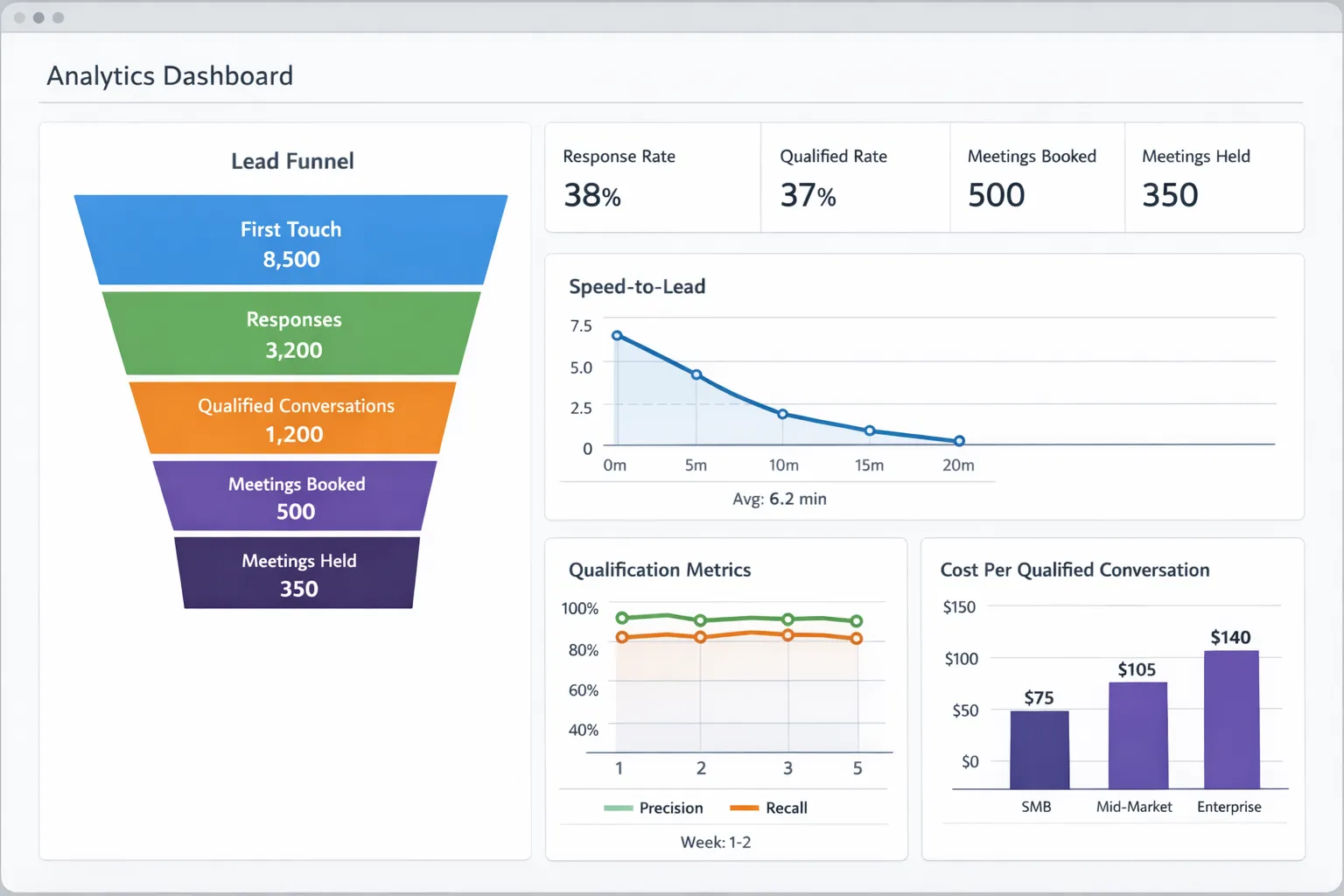
- Analytics, a single dashboard that shows coverage, speed, conversion by segment, message test results, and the cost per qualified conversation. Instrument both model quality and buyer experience.
If you are starting from zero on orchestration and governance, our primer on AI Sales Automation: From Prospecting to Qualification covers pillars, guardrails, and a pragmatic rollout.
What to measure, and how to know it is working
Track three categories of metrics, leading indicators, quality, and business impact. Report by channel and cohort, not just totals.
| Metric | How to calculate | Why it matters |
|---|---|---|
| Speed to first touch | Median minutes from lead creation to first message sent | Faster responses lift connect and qualification rates |
| Response rate | Replies received divided by delivered messages | Validates message-market fit and targeting |
| Qualified conversation rate | Conversations marked qualified divided by total responses | Measures how well your prompts and targeting elicit buying signals |
| Precision of qualification | Leads that become SQL or Opportunity divided by all qualified leads | Guards against over-qualification and wasted meetings |
| Recall of qualification | SQLs that had a prior qualified flag divided by all SQLs | Reveals under-qualification and leakage |
| Meeting book rate | Meetings booked divided by qualified conversations | Tests your handoff and call-to-action |
| Show rate | Held meetings divided by meetings booked | Indicates whether prospects truly understood value |
| Time to qualified | Median minutes from first touch to qualified disposition | Shows whether automation is removing delay |
| Cost per qualified conversation | Total program cost divided by qualified conversations | Ties spend to verified outcomes |
| Negative signal rate | Opt-outs, spam reports, or blocks divided by total outreach | Protects brand and channel health |
Benchmarks vary by industry and ACV. The right goal is lift over your own baseline. Run A/B tests, one variable at a time, with at least two weeks of traffic or until you reach statistical confidence. For channel-specific safety and pacing guidance, refer to Automated LinkedIn Outreach: Do It Safely and Effectively.
Signal design, what to capture and weight
Great automation starts with the right inputs. Capture the following and make them visible to both AI and humans:
- Fit, company size, industry, tech stack, region, account tier, buying role.
- Intent, content consumption, pricing or integration page views, third-party intent topics.
- Behavior, product usage milestones, trial age, invited teammates, integration installs.
- Conversation signals, objections, priorities, project names, time windows, buying committee members.
- Outcomes, dispositions with standardized reasons such as not ICP, no timeline, competitor, budget freeze, or referred to partner.
Use rules to gate out obvious non-ICP cases and prioritize clear high-intent. Use models to rank the rest. Then use conversation to validate and enrich.
A 30, 60, 90 day rollout plan
Days 1 to 30, instrument and validate in shadow
- Align definitions and SLAs for MQL, SAL, SQL, and disqualification reasons. Share examples with reps.
- Map your minimal data schema and fields needed for qualification. Normalize sources and clean picklists.
- Stand up scoring with simple rules first. Run models in shadow if available. Document rationale.
- Draft prompts and message templates by segment. Keep tone friendly and concise.
- Turn on automation in shadow mode. AI drafts messages and dispositions, humans send and finalize. Compare outcomes to manual baseline.
Days 31 to 60, go live for the highest intent, start testing
- Launch automation for hand-raisers, pricing page visitors, and clear product milestones.
- Begin A/B testing on openers, clarifying questions, and CTAs. Limit to one change per test.
- Expose score explanations in CRM and add conversation transcripts to records for coaching.
- Implement conversation override so reps can step in on complex or strategic accounts.
- Report weekly on lift in speed to first touch, qualified rate, and precision.
Days 61 to 90, expand segments and tighten governance
- Add outbound LinkedIn conversation qualification to target ICP segments. Calibrate pacing by persona.
- Introduce multi-threading for ABM accounts where buying committees are common.
- Tune routing and follow-up cadences based on conversion by segment and role.
- Add negative signal monitoring and alerts. Review opt-outs and spam complaints each week.
- Publish the playbook and dashboards. Train, then retrain. Celebrate early wins.
For a deeper dive into the end-to-end workflow and controls, see AI SDR: Automate Conversations, Qualify Faster, Book More.
Governance, compliance, and buyer experience
- Permission, respect regional privacy laws and platform policies. Provide clear opt-outs and honor them immediately.
- Provenance, label automation appropriately in internal systems and log who or what sent messages.
- Pacing, set daily and hourly caps by channel and persona. Avoid high-volume blasts that harm domain or account health.
- Brand, maintain consistent voice and avoid making claims that legal or product cannot support.
- Records, store conversations, dispositions, and reasons in CRM to enable audits and coaching.
How Kakiyo fits in your automated qualification stack
Kakiyo manages personalized LinkedIn conversations at scale from first touch to qualification to meeting booking so SDRs can focus on high-value opportunities. Teams use it to:
- Run autonomous LinkedIn conversations that feel human and on-brand.
- Qualify prospects with AI-driven scoring plus short, useful questions.
- Create and test prompts with A/B testing and industry-specific templates.
- Monitor an intelligent scoring system and a centralized real-time dashboard.
- Manage many threads at once, with conversation override for human takeovers.
- Report outcomes with advanced analytics and cohort views that RevOps can trust.
If your goal is a measurable lift in qualified conversations, faster speed to lead, and more meetings with the right buyers, start a focused 90 day rollout. Keep the scope tight, measure lift against baseline, and expand once you have two wins in two segments. The combination of clear definitions, clean data, conversational AI, and disciplined measurement is what turns automation into pipeline.
FAQ
What is the difference between a lead and a qualified prospect?
A lead is simply a potential contact or account. A qualified prospect has enough verified fit, intent, and context to justify a next sales step.
What makes qualification trustworthy?
Qualification is trustworthy when it relies on auditable signals, not labels alone. The more evidence a team can verify, the easier it is to align sales, marketing, and RevOps.
Should qualification be based on one score?
Not by itself. Scores are useful summaries, but teams still need explicit criteria around fit, buying signals, and next-step readiness.
How do I implement proof-based qualification in my team?
Start by defining what evidence is required at each stage, then make those signals visible in your workflows. The goal is consistency across inbound, outbound, and partner-sourced leads.