
 Ilan Asseo
NetSuite Business Development Representative: Role Guide
Practical guide for NetSuite Business Development Representatives on conversation-driven outbound (LinkedIn-first), proof-based qualification, tool.

Most NetSuite BDR teams struggle with ERP qualification because the sales cycle is long, multi-stakeholder, and hard to self-identify. This guide provides a practical framework for NetSuite BDRs to run better outbound, qualify faster, and book meetings that actually hold.
LinkedIn drives 80% of B2B leads from social media (LinkedIn’s own benchmark), but most NetSuite outbound motions still break at the same place: the chat. A NetSuite BDR who can control multi-turn conversations and capture real qualification proof will outperform a BDR who just “sends more touches.”
A NetSuite Business Development Representative role is unusually demanding because ERP change is high-stakes, multi-stakeholder, and slow to self-identify. Your job is not to “get interest.” It’s to surface a credible change event, qualify it fast, and hand an AE a meeting that actually holds.
Industry evidence: Salesforce Research reports that sales reps spend only 28% of their week actually selling, with the rest consumed by deal management, data entry, and other non-selling work.
Source: Salesforce State of Sales
What is a NetSuite Business Development Representative?
A NetSuite Business Development Representative (BDR) is an outbound rep who targets accounts likely to need a new ERP (or to expand their NetSuite footprint), starts conversations (often on LinkedIn), qualifies for fit and timing, and books sales meetings. The role is measured on qualified conversations, meeting quality, and clean handoffs, not just activity.
Tool stack for a NetSuite Business Development Representative (comparison table)
| Tool Name | Best For | Key Feature | Starting Price |
|---|---|---|---|
| Kakiyo | Autonomous LinkedIn conversation management for NetSuite outbound | AI runs the full LinkedIn thread, qualifies with scoring, and books meetings | Contact sales |
| LinkedIn Sales Navigator | Building tight NetSuite ICP lists and monitoring triggers | Account/lead lists + alerts that feed better first touches | From $99.99/user/month (list price) |
| Apollo | Sourcing contact data and enriching buying groups | Multi-contact enrichment to expand finance and ops stakeholders | Free plan available |
| Outreach | Scaling multi-channel sequencing once messaging is proven | Sequencing + task workflows for rep-led execution | Contact sales |
| Gong | Coaching NetSuite discovery and improving handoff quality | Conversation intelligence and deal-level patterns | Contact sales |
| Calendly | Reducing meeting friction for busy finance stakeholders | Scheduling links and routing | Free plan available |
Kakiyo
What it does (2 sentences) Kakiyo autonomously manages personalized LinkedIn conversations end to end, from first touch through qualification and meeting booking. Instead of only automating sends, it keeps the thread moving, handles common replies, and escalates to the SDR when it’s time to close.
Standout feature (1 sentence) Kakiyo’s edge is that it qualifies in-thread using an intelligent scoring system and can move qualified prospects to a booked meeting without the rep living in the inbox.
Who it’s for (1 sentence) NetSuite BDR teams that are LinkedIn-first and want more qualified meetings without adding headcount.
Pricing Contact sales at Kakiyo.
Pros (2-3 bullets)
- Runs multi-turn LinkedIn conversations autonomously (not just connection requests and follow-ups).
- Built for controlled experimentation (prompts, A/B testing) and measurable outcomes.
- Human override controls let you step in on sensitive threads.
Cons (1-2 bullets)
- If your team is not committed to a LinkedIn-first motion, you will not get full value.
- You still need clear qualification criteria, otherwise automation scales inconsistency.
LinkedIn Sales Navigator
What it does (2 sentences) Sales Navigator helps a NetSuite BDR build target account lists, find the right personas (Controller, VP Finance, CFO, RevOps/FP&A, Ops leaders), and track job changes or account signals. It is usually the highest leverage way to keep outbound relevant without spending hours per day on manual research.
Standout feature (1 sentence) Saved searches and alerts make it easier to run trigger-led outreach instead of static списts.
Who it’s for (1 sentence) Every NetSuite BDR who prospects on LinkedIn and needs repeatable targeting.
Pricing From $99.99/user/month (list price) on Sales Navigator pricing.
Pros (2-3 bullets)
- Strong filters for ICP slicing and persona targeting.
- Alerts help you time outreach around real change.
- Clean workflow for list building and multithreading.
Cons (1-2 bullets)
- It does not manage the conversation for you.
- Teams often over-index on list building and under-invest in qualification.
Apollo
What it does (2 sentences) Apollo helps a NetSuite BDR source and enrich contacts so you can reach the full buying group (finance, ops, IT, sometimes procurement). It is most valuable when you use it to expand stakeholder coverage, not to spray more messages.
Standout feature (1 sentence) It’s fast for building account contact maps across departments.
Who it’s for (1 sentence) BDRs who need cost-effective contact discovery and enrichment.
Pricing Free plan available (see Apollo pricing).
Pros (2-3 bullets)
- Quick contact discovery for buying-group expansion.
- Useful enrichment to reduce bad-fit outreach.
- Helps standardize list building across reps.
Cons (1-2 bullets)
- Data quality varies by segment, you need spot checks.
- It does not solve thread control or qualification in the chat.
Outreach
What it does (2 sentences) Outreach is a sequencer that coordinates rep-led touches across email, calls, and tasks. For a NetSuite BDR team, it’s a solid system for consistency once you already know what messaging and segments work.
Standout feature (1 sentence) Strong workflow and task orchestration for high-volume execution.
Who it’s for (1 sentence) Teams running mature multi-channel outbound where reps still own the conversation.
Pricing Contact sales via Outreach.
Pros (2-3 bullets)
- Proven sequencing and rep productivity workflows.
- Easy to standardize plays across a team.
- Good fit when leadership wants tight process control.
Cons (1-2 bullets)
- It is cadence-driven, not conversation-driven.
- You can still lose meetings to slow follow-up and weak qualification.
Gong
What it does (2 sentences) Gong records and analyzes sales calls so teams can improve discovery, objection handling, and handoffs. For NetSuite motions, it’s useful because the quality bar for “qualified meeting” is high and patterns repeat across segments.
Standout feature (1 sentence) It turns calls into coachable, searchable evidence instead of anecdotal feedback.
Who it’s for (1 sentence) Teams that want to improve meeting quality and AE acceptance through coaching and calibration.
Pricing Contact sales via Gong.
Pros (2-3 bullets)
- Speeds up coaching for new BDRs and new AEs.
- Helps standardize what “qualified” means in real conversations.
- Useful for diagnosing why meetings do not convert.
Cons (1-2 bullets)
- It improves conversations you already have, it does not create new ones.
- Without a qualification rubric, insights stay subjective.
Calendly
What it does (2 sentences) Calendly removes friction from booking and rescheduling, especially with finance leaders who are busy and protective of calendar time. Used well, it reduces “sounds good” threads that never turn into a scheduled meeting.
Standout feature (1 sentence) Routing and scheduling links shorten the time from qualified reply to booked slot.
Who it’s for (1 sentence) Any NetSuite BDR booking meetings across multiple time zones and stakeholders.
Pricing Free plan available (see Calendly pricing).
Pros (2-3 bullets)
- Faster scheduling and fewer back-and-forth messages.
- Better rescheduling behavior, fewer no-shows.
- Works across teams and shared calendars.
Cons (1-2 bullets)
- It cannot fix weak qualification.
- If you push links too early, it can reduce reply quality.
The NetSuite BDR job in practice: what you’re really qualifying
NetSuite is not a “nice-to-have” tool. It’s an ERP platform that usually becomes the system of record for financials, inventory, order-to-cash, procurement, and reporting. That means:
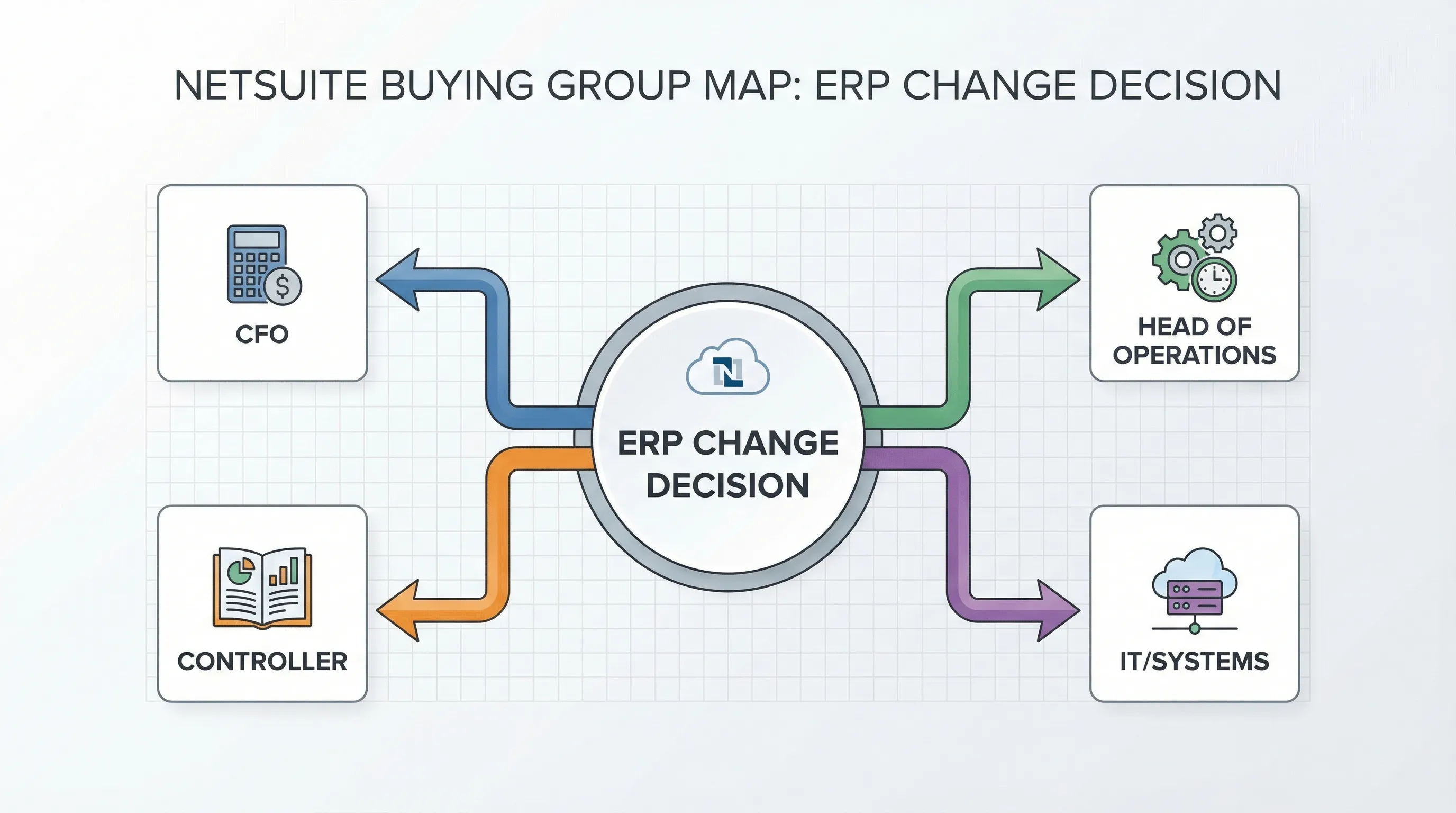
- The buying group is real (finance plus adjacent operators).
- The risk of switching is real (migration, change management, audit concerns).
- The BDR’s job is to locate an actual operational break, not generic curiosity.
NetSuite also has scale. NetSuite publicly claims 37,000+ customers (Oracle NetSuite), which matters for BDRs because it signals a huge ecosystem of current users (expansion, multi-subsidiary complexity, module add-ons) and competitive displacement targets.
Sources: LinkedIn B2B social lead benchmark and Oracle NetSuite customer count claim.
ICP signals and triggers a NetSuite BDR should care about
A NetSuite BDR wins by targeting accounts where ERP pain is already expensive.
High-signal triggers (better than “growing fast”) tend to be:
- Multi-entity complexity: new subsidiaries, international expansion, consolidation pain.
- Revenue recognition pressure: audits getting stricter, subscription complexity, deferred revenue issues.
- Inventory and fulfillment strain: stockouts, manual purchasing, disconnected warehouse data.
- Tool sprawl: QuickBooks plus spreadsheets plus custom integrations becoming fragile.
- Leadership change: new CFO/Controller who wants a reset (a classic catalyst for ERP projects).
Your outbound should reference a plausible trigger and ask a low-friction question that invites correction. If you are wrong, you still get data. If you are right, you earn the next message.
Qualification framework for NetSuite conversations (what “good” looks like)
ERP qualification fails when BDRs only capture “pain” and skip proof. Use a proof-based approach where each meeting has an evidence packet the AE can trust.
| Qualification area | What to ask (thread-safe) | Proof to capture in CRM/handoff |
|---|---|---|
| Current system | “What are you running today for financials and ops?” | Named system(s), owner, integration dependencies |
| Breakpoint | “Where does it crack first: close, reporting, rev rec, inventory, approvals?” | Specific workflow failure, impact statement |
| Business impact | “What does that cost you today (time, errors, missed revenue, audit risk)?” | Quantified or qualified impact, who feels it |
| Timeline catalyst | “Is there a forcing event this quarter (audit, expansion, new entity)?” | Dated event or explicit ‘no timeline’ |
| Stakeholders | “Who besides finance needs to be in the first call?” | Named buying group roles, meeting attendees |
| Next step readiness | “Worth a 20-min scoping call to see if this is even an ERP project?” | Clear yes/no, meeting booked or disqualified reason |
If you want a deeper, auditable system for evidence capture, Kakiyo’s qualification approach aligns with the proof-based model described in A Lead Is Not a Qualified Prospect.
NetSuite BDR messaging that gets replies (without sounding like an ERP pitch)
Most NetSuite outbound fails because it tries to sell the product before the buyer admits they have an ERP problem. Better approach: lead with a believable operational pattern, then ask a small question.
Three short LinkedIn-first openers you can adapt:
- Close and reporting: “Quick question, are you still doing any month-end close work in spreadsheets between systems? I’m seeing that break once teams add entities.”
- Inventory strain: “When order volume picked up, did your inventory accuracy get worse before it got better? Curious if you’re fighting that now or if ops has it dialed.”
- CFO reset trigger: “Noticed you stepped into the CFO seat recently, are you planning any systems cleanup this year or keeping the stack as-is?”
The goal is not to “book the demo.” The goal is to earn a real reply you can qualify. If you need more message architecture, use the frameworks in LinkedIn Outreach Messages That Get Replies, then tailor the proof and triggers to ERP.
KPIs for a NetSuite Business Development Representative (measure outcomes, not activity)
NetSuite BDR teams get mismanaged when leaders track dials, sends, or connections and ignore meeting quality. Track the funnel where it actually breaks:
| KPI | Why it matters for NetSuite motions | What “good” indicates |
|---|---|---|
| Reply rate (by segment) | ERP buyers are skeptical, segment relevance shows up here first | ICP and trigger selection are working |
| Qualified conversation rate | Proves you can turn replies into evidence | BDR can control the thread, not just start it |
| Meetings booked → meetings held | ERP calendars are hard, this is a real quality filter | You’re setting meetings with real intent |
| AE acceptance rate | NetSuite cycles are expensive, AE time is precious | Your qualification packet is credible |
| Time to first meaningful response | Speed matters once finance responds | You are not losing momentum in the inbox |
If you want a clean scorecard with definitions and measurement discipline, pull the KPI structure from Sales Development Representative: KPIs That Matter and apply it to your NetSuite segments.
A practical day-in-the-life workflow for NetSuite BDRs
A NetSuite BDR’s day should be organized around conversation control, not “task completion.” The highest leverage workflow is:
- Build a small, high-fit hit list (accounts plus 2 to 5 stakeholders each).
- Run trigger-first outreach on LinkedIn.
- Convert replies into a proof packet (system, breakpoint, impact, timing, stakeholders).
- Book meetings only when the proof clears your bar.
The most common operational failure is letting threads sit because reps are busy “prospecting.” That’s where autonomous conversation management tools like Kakiyo are designed to win: they keep threads warm, qualify consistently, and escalate only when the prospect is meeting-worthy.
Which tool should you choose?
If you want autonomous AI conversation and LinkedIn lead qualification, use Kakiyo.
If you want the best way to build NetSuite ICP lists on LinkedIn, use LinkedIn Sales Navigator.
If you want fast buying-group contact discovery and enrichment, use Apollo.
If you want rep-led sequencing across channels after you have a proven play, use Outreach.
If you want to improve discovery quality and coaching from real calls, use Gong.
FAQs
What does a NetSuite Business Development Representative do?
A NetSuite Business Development Representative targets accounts likely to need ERP change, starts outbound conversations (often on LinkedIn), qualifies for fit and timing, and books meetings for an AE. The role is judged on qualified conversations, meeting quality, and handoff evidence, not raw outreach volume.
What skills matter most for a NetSuite BDR?
Commercial judgment and conversation control matter more than “pitching.” The best NetSuite BDRs can identify ERP triggers, ask thread-safe qualification questions, capture proof, and coordinate multi-stakeholder meetings without wasting AE time.
How do you qualify NetSuite leads on LinkedIn?
Start with current system and the operational breakpoint (close, reporting, rev rec, inventory, approvals), then push for impact and a forcing event. Only book when you can name stakeholders and document a clear next step, otherwise you create meetings that do not hold.
What tools should a NetSuite BDR use?
At minimum: LinkedIn Sales Navigator for targeting, a data tool for stakeholder coverage, and a scheduling tool. If your bottleneck is managing and qualifying multi-turn LinkedIn threads at scale, use a conversation engine like Kakiyo instead of a send-only automation tool.
Is Kakiyo a LinkedIn outreach automation tool?
Kakiyo goes beyond LinkedIn outreach automation by managing the full conversation autonomously. It can qualify prospects using an intelligent scoring system and book meetings, with human override controls for safety.
Book a demo at Kakiyo.